cts:document-permission-query()
Released in MarkLogic 11
 Minimum Llamaverse Version: 2
By far, this has been one of the most useful small updates in MarkLogic 11: cts:document-permission-query(). Prior to this release, determining which content had specific permissions was a time-, memory-, and CPU-intensive task. You typically had to run a query as a user with the role in question.
If one wanted to compare more than one role such as "Which documents have read access by Role-A and do not have read access by Role-B" becomes more complex. In the end, such questions would be done in-memory against various sequences of URIs. Now, we can just stay in the cts-query space and resolve all of this at query time.
API Context for This Article
| Context Item | What this article uses |
|---|---|
| Data set | purpose-built sample set created by the setup script in this article |
| Primary document scope | 360,000 test documents with controlled permission combinations |
| Primary query feature | cts:document-permission-query() in MarkLogic 11 |
| Fields or views used | None |
| Index context | Permission resolution is performed directly in cts query/index evaluation rather than URI list post-processing |
If your counts differ, confirm the setup script completed and that role grants on the test documents match the intended matrix.
Setup
Like all of our in-depth feature investigations, we set up data that genuinely tests behaviour. For this feature, comparing pre-MarkLogic-11 and MarkLogic 11 approaches requires roles and documents with multiple permission combinations. For brevity, we show simplified estimates, while the original test run verified exact counts. For completeness, we include full setup code. The setup may look complex (for example spawning to reduce load time), but that reflects the larger validation runs where we also used URI and attribute checks.
<permission-test>
  <title>Permission query sample</title>
  <description>Used to demonstrate permission-based proximity and scope queries.</description>
</permission-test>
xquery version "1.0-ml";
import module namespace sec="http://marklogic.com/xdmp/security" at
    "/MarkLogic/security.xqy";

declare function local:create-roles($role-names){
  for $role-name in $role-names
    return xdmp:invoke-function(function(){
      if(not(sec:role-exists($role-name)))
        then sec:create-role($role-name, "sample role for content validation of cts:document-permission-query()", (), (), (), (), (), ())
        else ()
    }, map:entry("database", xdmp:security-database()))
};

declare function local:create-docs($permissions, $prefix, $iterations, $number-per-iteration){
  (: spawn to get them in faster :)
  for $x in (1 to $iterations)
    return xdmp:spawn-function(function(){
        for $y in (1 to $number-per-iteration)
          let $uri := "/clever-llamas/test/cts-document-permission-query/" || $prefix || ":" || $x || "-" || $y
          return (1,  xdmp:document-insert($uri, <llama prefix="{$prefix}" x="{$x}" y="{$y}"/>, map:entry("collections", "/clever-llamas/test/cts-document-permission-query")=>map:with("permissions", $permissions)))
    }, map:entry("result", fn:true()))
};

(: roles :)
let $role-names := ("llama-writer", "llama-herder", "llama-walker")
let $_ := local:create-roles($role-names)

(: Permissions that we will use in the various sets of data :)
let $llama-writer-permissions := (
  xdmp:permission("llama-writer", "insert", "object"),
  xdmp:permission("llama-writer", "node-update", "object"),
  xdmp:permission("llama-writer", "update", "object")
)
let $llama-herder-permissions := (xdmp:permission("llama-herder", "read", "object"))
let $llama-walker-permissions := (xdmp:permission("llama-walker", "read", "object"))

return fn:count((
  (: 90000 with write only :)
  local:create-docs(($llama-writer-permissions), "writer-only", 30, 3000),
  (: 90000 where the herder can also read, but not the walker :)
  local:create-docs(($llama-writer-permissions, $llama-herder-permissions), "herder", 30, 3000),
  (: 90000 where the walker can also read, but not the herder:)
  local:create-docs(($llama-writer-permissions, $llama-walker-permissions), "walker", 30, 3000),
  (: 90000 where the walker AND herder can read:)
  local:create-docs(($llama-writer-permissions, $llama-walker-permissions,  $llama-herder-permissions), "walker-and-herder", 30, 3000)
))
'use strict';

const collection = '/clever-llamas/test/cts-document-permission-query';
const adminPerm = xdmp.permission('admin', 'read');
const readerPerm = xdmp.permission('rest-reader', 'read');

xdmp.documentInsert(
  `${collection}/public.json`,
  { id: 'public', species: 'llama' },
  { permissions: [adminPerm, readerPerm], collections: [collection] }
);

xdmp.documentInsert(
  `${collection}/admin-only.json`,
  { id: 'admin-only', species: 'alpaca' },
  { permissions: [adminPerm], collections: [collection] }
);

const results = {
  total: cts.estimate(cts.collectionQuery(collection)),
  roleFiltered: cts.estimate(cts.documentPermissionQuery('rest-reader', 'read'))
};

({
  sample: 'cts/document-permission-query/assets/setup.sjs',
  kind: Array.isArray(results) ? (results.every((item) => typeof item === 'object' && 'subject' in item && 'predicate' in item && 'object' in item) ? 'triples' : 'rows') : ((results !== null && typeof results === 'object') ? 'object' : 'scalar'),
  count: Array.isArray(results) ? results.length : 0,
  data: results
});
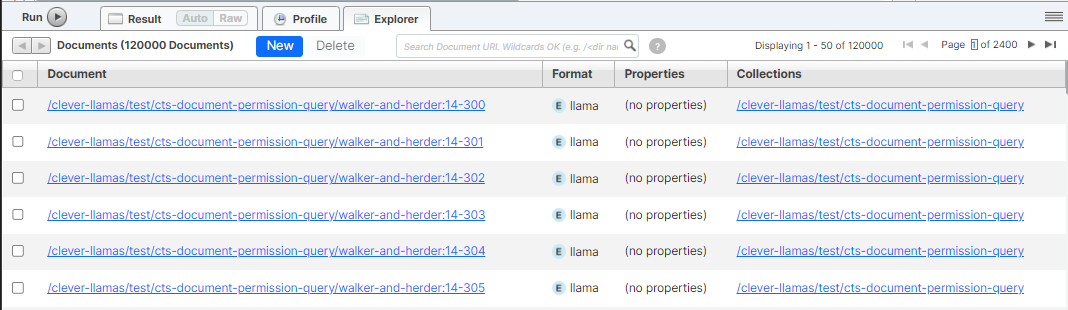
In this case, there are 360,000 documents loaded:
- 90,000 with write only
- 90,000 where the herder can read, but not the walker
- 90,000 where the walker can read, but not the herder
- 90,000 where the walker AND herder can read
Samples
Below we have tried to answer the same question first in MarkLogic 10 as well as MarkLogic 11. We've included one example. However it is easy to expand on the same with different combinations.
QUESTION
Which documents have read access by both the llama-walker AND llama-herder?
MarkLogic 10 Solution
This question is not easily answered in versions prior to MarkLogic 11. Even with a TDE template and xdmp:node-permissions(), there is no simple way to unpack that permission set in Optic before MarkLogic 11.
For this, I have usually had to take a 3-step approach:
- Generate a temporary user with the role in question
- Invoke a function running as that user to get the URIs
- Tear down the user in question
<permission-test>
  <title>Permission query sample</title>
  <description>Used to demonstrate permission-based proximity and scope queries.</description>
</permission-test>
xquery version "1.0-ml";
import module namespace sec="http://marklogic.com/xdmp/security" at
    "/MarkLogic/security.xqy";

(: function for creating temporary user and attaching to a role :)
declare function local:create-temporary-user-for-role($role-name){
  let $user-name := "clever-llamas-temp-" || sem:uuid-string()

  let $_ := xdmp:invoke-function(function(){
    sec:create-user(
        $user-name,
        "temporary-user for document-permissions-query",
        sem:uuid-string(),
        $role-name,
        (),
        ()
    )

  }, map:entry("database", xdmp:security-database()))

  return $user-name
};

(: function for deleting temporary user:)
declare function local:delete-temporary-user($user-name){
  xdmp:invoke-function(function(){
    if(fn:starts-with($user-name, "clever-llamas-temp-"))
      then
        xdmp:invoke-function(function(){sec:remove-user($user-name)}, map:entry("database", xdmp:security-database()))
      else
        ()
  }, map:entry("database", xdmp:security-database()))
};

(: Temporary users :)
let $llama-walker-user := local:create-temporary-user-for-role("llama-walker")
let $llama-herder-user := local:create-temporary-user-for-role("llama-herder")

(: URIs for llama-walker:)
let $llama-walker-uris := xdmp:invoke-function(function(){
    cts:uris((), (), cts:collection-query("/clever-llamas/test/cts-document-permission-query"))
    }, map:entry("userId", xdmp:user($llama-walker-user))
  )

return xdmp:invoke-function(function(){
    cts:estimate(cts:and-query((
          cts:collection-query("/clever-llamas/test/cts-document-permission-query"),
          cts:document-query($llama-walker-uris)
        ))
      )
    }, map:entry("userId", xdmp:user($llama-herder-user))
  )
'use strict';

const collection = '/clever-llamas/test/cts-document-permission-query';
const baseUris = cts.uris(null, ['limit=100'], cts.collectionQuery(collection)).toArray();

const uris = baseUris.filter((uri) => {
  const perms = xdmp.documentGetPermissions(uri);
  return perms.some((p) => p['role-id'] === xdmp.role('rest-reader') && p.capability === 'read');
});

const results = {
  estimate: uris.length,
  uris
};

({
  sample: 'cts/document-permission-query/assets/pre-11.sjs',
  kind: Array.isArray(results) ? (results.every((item) => typeof item === 'object' && 'subject' in item && 'predicate' in item && 'object' in item) ? 'triples' : 'rows') : ((results !== null && typeof results === 'object') ? 'object' : 'scalar'),
  count: Array.isArray(results) ? results.length : 0,
  data: results
});
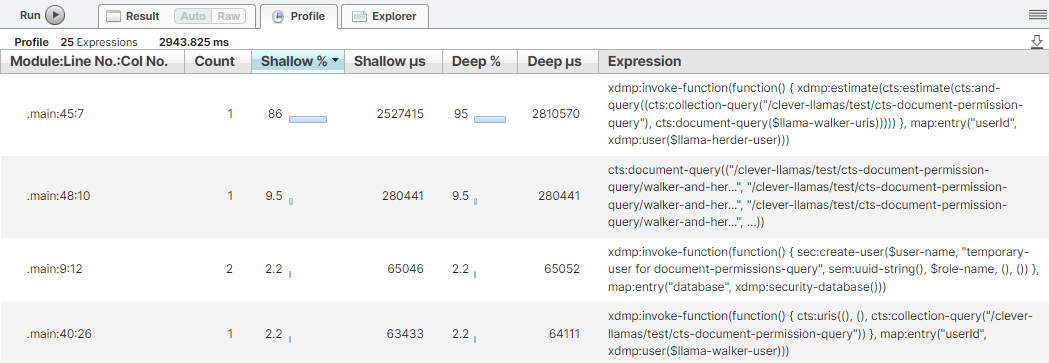
This takes some time to run. It is not surprising that the majority of time is taken in running the final query. This would be comparing to the entire list of URIs from the llama-walker - of which only 1/2 would match.
MarkLogic 11 Solution
In MarkLogic 11, we can pass a simple query and have it resolve directly against fragments and embedded permissions via cts:document-permission-query().
<permission-test>
  <title>Permission query sample</title>
  <description>Used to demonstrate permission-based proximity and scope queries.</description>
</permission-test>
xquery version "1.0-ml";

(: documents that can be read by llama herder AND llama-walker:)
let $query := cts:and-query((
  cts:collection-query("/clever-llamas/test/cts-document-permission-query"),
  cts:document-permission-query("llama-herder", "read"),
  cts:document-permission-query("llama-walker", "read")
))

return cts:estimate($query) (:cts:uris((), (),  $query):)
'use strict';

const collection = '/clever-llamas/test/cts-document-permission-query';
const query = cts.andQuery([
  cts.collectionQuery(collection),
  cts.documentPermissionQuery('rest-reader', 'read')
]);

const results = {
  estimate: cts.estimate(query),
  uris: cts.uris(null, ['limit=10'], query).toArray()
};

({
  sample: 'cts/document-permission-query/assets/11.sjs',
  kind: Array.isArray(results) ? (results.every((item) => typeof item === 'object' && 'subject' in item && 'predicate' in item && 'object' in item) ? 'triples' : 'rows') : ((results !== null && typeof results === 'object') ? 'object' : 'scalar'),
  count: Array.isArray(results) ? results.length : 0,
  data: results
});
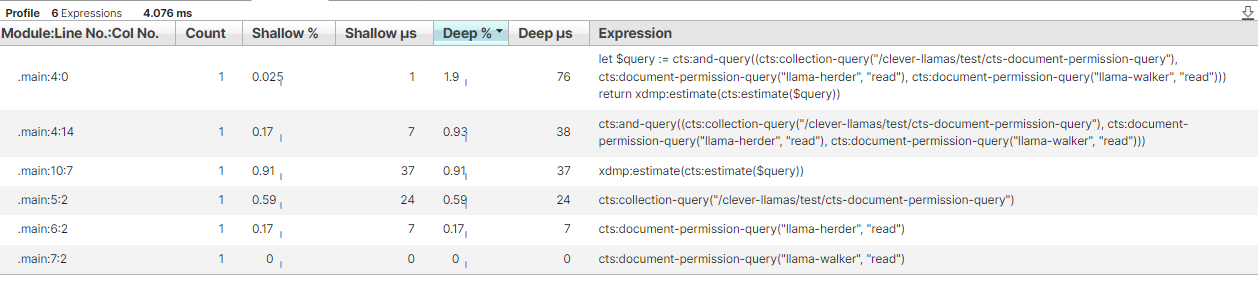
As we can see, the results are what we would expect from something resolved immediately at the index level.
Conclusion
In a real production case, the question was: "Which documents are missing read permission for role X?".
In MarkLogic 10, the practical route was to enumerate URIs and compare against a query run with elevated rights. On a large cluster, that cost minutes and cross-node traffic. In MarkLogic 11, cts:document-permission-query() pushes this logic into index evaluation where it belongs.
Use the newer query when available. You get simpler code, lower resource utilisation, and faster answers during access-control audits.
Need Some Help?
Looking for more information on this subject or any other topic related to MarkLogic? Contact Us (info@cleverllamas.com) to find out how we can assist you with consulting!
- API Context for This Article
- Setup
- Samples
- MarkLogic 10 Solution
- MarkLogic 11 Solution
- Conclusion